# Log In With Telegram
Telegram offers app and website developers **a free and open platform** that lets over **1 billion** users seamlessly **sign up and log in** with their Telegram accounts.
#### Benefits of Telegram Login
- **Higher conversion**
Users sign in with a few taps, boosting conversion and retention.
- **Lower verification costs**
Users can share their **verified phone number**, removing the need for expensive codes.
- **Direct communication channels**
You can reach your users within Telegram, with built-in push notification support.
- **Further integration**
You can deliver more services directly via the [Bot API](/bots.md) and [Mini Apps](/bots/webapps.md).
> **Note:** This document describes the Telegram Login library and the new [OpenID Connect](https://en.wikipedia.org/wiki/OpenID) login flow.
The legacy iframe-based JavaScript widget documentation is archived [here](/widgets/login-legacy.md).
---
### Getting Started
Telegram offers a [compact tool](#using-the-telegram-login-library) to quickly add Telegram login buttons to your interface. You can also directly access our library's [JS API](#available-methods).
For mobile developers, we also provide ready-to-use **[Native SDKs](#native-sdks)** for iOS and Android.
Alternatively, Telegram supports the standard [OpenID Connect](https://en.wikipedia.org/wiki/OpenID#OpenID_Connect_(OIDC%29) protocol. This allows you to integrate Telegram authentication into your application using any OIDC-compatible library or authentication platform (e.g., Keycloak, Authentik, Auth0 etc.).
Our implementation follows the standard [Authorization Code Flow](https://openid.net/specs/openid-connect-core-1_0.html#CodeFlowAuth) with **PKCE** support.
> For an in-depth understanding of the general OIDC flow, please refer to the [OpenID Foundation's Developer Guide](https://openid.net/developers/how-connect-works).
#### TL;DR
- **[Set up a bot](#setting-up-a-bot)** to represent your application.
- **[Register your Allowed URLs](#registering-your-allowed-urls)** via [@BotFather](https://t.me/botfather) and obtain your Client ID and Secret.
- **[Add the Telegram Login library](#using-the-telegram-login-library)** to your page.
- **[Integrate Native SDKs](#native-sdks)** if you are building an iOS or Android mobile application.
- **[Validate ID tokens](#validating-id-tokens)** to cryptographically verify incoming requests.
Alternatively, you can [use an OpenID integration](#openid-connect).
> Having trouble with any of the steps above? Feel free to reach out to us at [@BotSupport](https://t.me/botsupport), making sure to include the hashtag #oidc in your message.
#### Setting up a bot
To use Telegram Login, you'll need a [**Telegram bot**](/bots.md#how-do-i-create-a-bot) to represent your application.
We strongly recommend that the **profile picture** of the bot corresponds with your website's logo, and that the bot's **name** reflects that connection. Users will see a confirmation box similar to the one below when logging in:
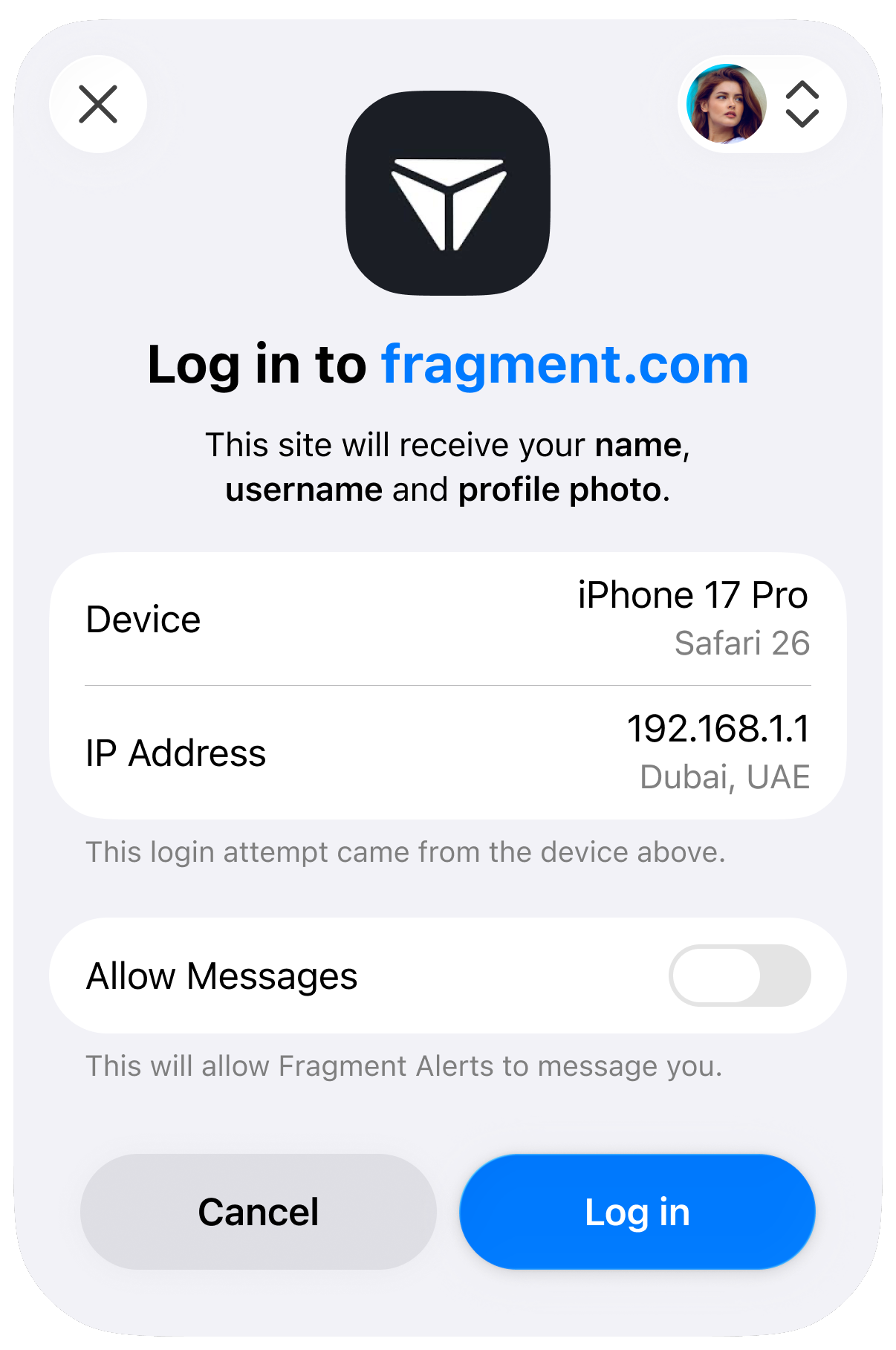
> Users are much more likely to authorize your app if the bot has a name and logo they recognize and expect. Official services can also [apply for verification](https://telegram.org/verify) from Telegram or [third parties](https://telegram.org/verify#third-party-verification) for greater transparency.
#### Registering your Allowed URLs
Once you have chosen a bot, open the [**@BotFather**](https://t.me/botfather?startapp) mini app, select the bot and then select **Login Widget**.
Add all **Allowed URLs** for your application. This includes the website origins where you embed the login widget (e.g., `https://example.com`) and specific redirect URIs for your OIDC flow (e.g., `https://example.com/auth/callback`). You can register multiple URLs to support different domains or endpoints.
In this section, [@BotFather](https://t.me/botfather) will also display your **Client ID** and **Client Secret**. Save these values securely – you will need them to configure your OIDC client.
> **Important:** For security reasons, Telegram will only process logins or redirect users using your pre-registered URLs.
### Using the Telegram Login library
Use the tool below to customize your button and get the HTML snippet for your website.
{login2-widget-config}
Alternatively, you can interact with the library using the following JS methods:
#### Available Methods
| Method | Description |
| :--- | :--- |
| `Telegram.Login.init(InitOptions, callback)` | Initialize the SDK and register an auth callback. |
| `Telegram.Login.open([callback])` | Open the login popup using the initialized options. |
| `Telegram.Login.auth(InitOptions, callback)` | Open the login popup with explicit options. |
#### InitOptions
| Option | Type | Description |
| :--- | :--- | :--- |
| `client_id` | number | Your bot’s Client ID provided by [@BotFather](https://t.me/botfather). |
| `scope` | array(`profile` \| `phone` \| `write`) | _Optional._ Ask for public profile info, a phone number, permission for your bot to message the user. |
| `lang` | string | _Optional._ UI language code (e.g., `en`, `es`). |
| `nonce` | string | _Optional._ Server-generated random string to be included in the resulting `id_token` to prevent replay attacks. |
#### Callback Data
When the login flow completes, the callback may receive either a success payload (user data) or an error.
| Field | Type | Description |
| :--- | :--- | :--- |
| `id_token` | string | An OIDC JWT token containing user claims. **Important: [Verify the validity of ID token server-side](#validating-id-tokens)** |
| `user` | [UserData](#user-data-structure) | Decoded `id_token`, containing the requested user info. |
| `error` | string | Error description. |
> **Important:** The `telegram-login.js` library relies on communicating with a popup window to complete the authentication flow. If your website serves the `Cross-Origin-Opener-Policy: same-origin` HTTP header, this cross-window communication will be blocked and the login process will fail. To ensure the JavaScript library functions correctly, you must either remove this header or use a more permissive policy, such as `Cross-Origin-Opener-Policy: same-origin-allow-popups`.
---
### Native SDKs
If you are building a native mobile application, Telegram provides dedicated SDKs to streamline the login experience on iOS and Android devices, bypassing the need for web-based views.
- **[Telegram Login for iOS](https://github.com/TelegramMessenger/telegram-login-ios)**
A native Swift package for integrating Telegram authentication into your iOS or iPadOS applications.
- **[Telegram Login for Android](https://github.com/TelegramMessenger/telegram-login-android)**
A native Android library allowing you to seamlessly authenticate users within your Kotlin or Java Android applications.
> **Note:** Complete setup guides, installation instructions, and usage examples for each platform can be found directly in the README files of their respective GitHub repositories.
---
### OpenID Connect
If you are using an OIDC-compatible library or identity broker, you can use the standard configuration values below.
**Discovery Document URL**
```
https://oauth.telegram.org/.well-known/openid-configuration
```
**Client Configuration**
| Parameter | Value |
| :--- | :--- |
| **Client ID** | The Client ID provided by BotFather |
| **Client Secret** | The Client Secret provided by BotFather |
| **Response Type** | `code` |
| **PKCE** | Recommended (S256) |
#### Available Scopes
You can request specific permissions when initiating authorization. The `openid` scope is required.
| Scope | Description | Claims Returned |
| :--- | :--- | :--- |
| `openid` | **Required.** Returns the user's unique identifier and auth timestamp. | `sub`, `iss`, `iat`, `exp` |
| `profile` | User's basic info: user ID, name, username, and profile photo URL. | `id`, `name`, `preferred_username`, `picture` |
| `phone` | User's verified **phone number**. Requires user consent. | `phone_number` |
| `telegram:bot_access` | Allows your bot to send direct messages to the user after login. | — |
#### User Data Structure
All requested user information is returned directly in the **ID token**. After successful authentication, the decoded ID token will look like this:
```json
{
"iss": "https://oauth.telegram.org",
"aud": "123456789",
"sub": "1234123412341234123",
"iat": 1700000000,
"exp": 1700003600,
"id": 987654321,
"name": "John Doe",
"given_name": "John",
"family_name": "Doe",
"preferred_username": "johndoe",
"picture": "https://cdn4.telesco.pe/file...",
"phone_number": "971577777777",
"phone_number_verified": true,
}
```
> Note that Telegram does not currently provide a separate `UserInfo` endpoint. However, some OIDC libraries may expect this endpoint by default, and you may need to **configure them** to skip a separate `userinfo` request.
---
### Manual Implementation
If you are integrating the OIDC flow manually without a library, use the endpoints and flow details below.
#### Endpoints
* **Authorization:** `https://oauth.telegram.org/auth`
* **Token:** `https://oauth.telegram.org/token`
* **Keys (JWKS):** `https://oauth.telegram.org/.well-known/jwks.json`
#### Initiate Authorization
Direct the user to the authorization endpoint with the following parameters. This URL must be opened in the user's browser.
```http
GET https://oauth.telegram.org/auth?
client_id=&
redirect_uri=&
response_type=code&
scope=openid%20profile%20phone&
state=&
code_challenge=&
code_challenge_method=S256
```
* **client_id**: Client ID provided by BotFather.
* **state**: A random string generated by your backend to prevent CSRF.
* **code_challenge**: Base64URL-encoded SHA256 hash of your code verifier (PKCE).
#### Exchange Code for Tokens
If the user approves the login, they will be redirected to your `redirect_uri` with a `code` parameter. Exchange this code for an access token and ID token by making a server-side POST request.
This request requires **Basic Authorization** using your Client ID and Client Secret (`base64(client_id:client_secret)`).
```http
POST https://oauth.telegram.org/token
Content-Type: application/x-www-form-urlencoded
Authorization: Basic
grant_type=authorization_code&
code=&
redirect_uri=&
client_id=&
code_verifier=
```
**Response:**
```json
{
"access_token": "...",
"token_type": "Bearer",
"expires_in": 3600,
"id_token": "eyJhbGciOiJ..."
}
```
#### Validating ID Tokens
The `id_token` is a signed JSON Web Token (JWT). Before trusting the user data inside, you **must** validate the signature:
1. **Fetch Keys:** specific public keys from the [JWKS endpoint](https://oauth.telegram.org/.well-known/jwks.json).
2. **Verify Signature:** Ensure the token was signed by Telegram.
3. **Verify Claims:** Check that `iss` is `https://oauth.telegram.org`, `aud` matches your Bot ID, and the token has not expired (`exp`).
#### Signing algorithm
Telegram signs ID tokens with `RS256` by default, which works with all OIDC libraries out of the box. If you need a different algorithm, you can change it under **Login Widget > Advanced** in [@BotFather](https://t.me/botfather):
| Algorithm | Notes |
| :--- | :--- |
| `RS256` | Default. |
| `ES256` | Smaller tokens, faster verification. |
| `EdDSA` | Ed25519 (TON, Solana curve). For Web3 integrations. |
| `ES256K` | secp256k1 (Bitcoin, Ethereum curve). For Web3 integrations. |
`EdDSA` and `ES256K` are restricted to the `openid` scope, since tokens signed with these algorithms may be relayed on-chain or verified by smart contracts. Currently, selecting either will reject `profile` and `phone` scopes.
---
> Once you have established a connection with the user, you can optionally use your **linked bot** to provide services **directly in the chat interface** via the [Bot API](/bots.md), or seamlessly offer your **entire web application inside Telegram** using [Mini Apps](/bots/webapps.md).