Machine-readable version of this page: /bots/telegram-login.md.
Log In With Telegram
Telegram offers app and website developers a free and open platform that lets over 1 billion users seamlessly sign up and log in with their Telegram accounts.
Benefits of Telegram Login
Higher conversion
Users sign in with a few taps, boosting conversion and retention.Lower verification costs
Users can share their verified phone number, removing the need for expensive codes.Direct communication channels
You can reach your users within Telegram, with built-in push notification support.Further integration
You can deliver more services directly via the Bot API and Mini Apps.
Note: This document describes the Telegram Login library and the new OpenID Connect login flow.
The legacy iframe-based JavaScript widget documentation is archived here.
Getting Started
Telegram offers a compact tool to quickly add Telegram login buttons to your interface. You can also directly access our library's JS API.
For mobile developers, we also provide ready-to-use Native SDKs for iOS and Android.
Alternatively, Telegram supports the standard OpenID Connect protocol. This allows you to integrate Telegram authentication into your application using any OIDC-compatible library or authentication platform (e.g., Keycloak, Authentik, Auth0 etc.).
Our implementation follows the standard Authorization Code Flow with PKCE support.
For an in-depth understanding of the general OIDC flow, please refer to the OpenID Foundation's Developer Guide.
TL;DR
- Set up a bot to represent your application.
- Register your Allowed URLs via @BotFather and obtain your Client ID and Secret.
- Add the Telegram Login library to your page.
- Integrate Native SDKs if you are building an iOS or Android mobile application.
- Validate ID tokens to cryptographically verify incoming requests.
Alternatively, you can use an OpenID integration.
Having trouble with any of the steps above? Feel free to reach out to us at @BotSupport, making sure to include the hashtag #oidc in your message.
Setting up a bot
To use Telegram Login, you'll need a Telegram bot to represent your application.
We strongly recommend that the profile picture of the bot corresponds with your website's logo, and that the bot's name reflects that connection. Users will see a confirmation box similar to the one below when logging in:
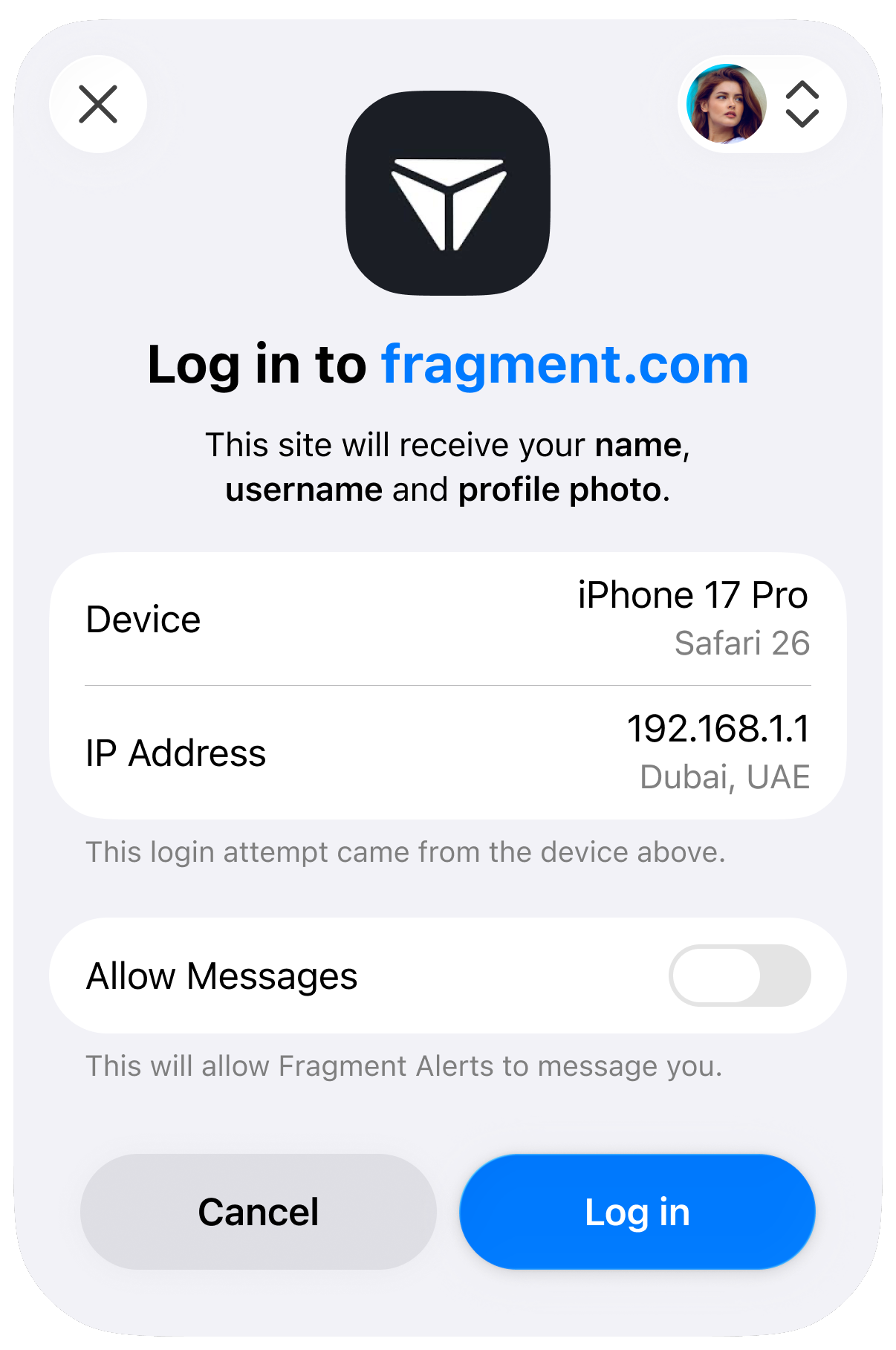
Users are much more likely to authorize your app if the bot has a name and logo they recognize and expect. Official services can also apply for verification from Telegram or third parties for greater transparency.
Registering your Allowed URLs
Once you have chosen a bot, open the @BotFather mini app, select the bot and then select Login Widget.
Add all Allowed URLs for your application. This includes the website origins where you embed the login widget (e.g., https://example.com) and specific redirect URIs for your OIDC flow (e.g., https://example.com/auth/callback). You can register multiple URLs to support different domains or endpoints.
In this section, @BotFather will also display your Client ID and Client Secret. Save these values securely – you will need them to configure your OIDC client.
Important: For security reasons, Telegram will only process logins or redirect users using your pre-registered URLs.
Using the Telegram Login library
Use the tool below to customize your button and get the HTML snippet for your website.
Alternatively, you can interact with the library using the following JS methods:
Available Methods
| Method | Description |
|---|---|
Telegram.Login.init(InitOptions, callback) |
Initialize the SDK and register an auth callback. |
Telegram.Login.open([callback]) |
Open the login popup using the initialized options. |
Telegram.Login.auth(InitOptions, callback) |
Open the login popup with explicit options. |
InitOptions
| Option | Type | Description |
|---|---|---|
client_id |
number | Your bot’s Client ID provided by @BotFather. |
scope |
array(profile | phone | write) |
Optional. Ask for public profile info, a phone number, permission for your bot to message the user. |
lang |
string | Optional. UI language code (e.g., en, es). |
nonce |
string | Optional. Server-generated random string to be included in the resulting id_token to prevent replay attacks. |
Callback Data
When the login flow completes, the callback may receive either a success payload (user data) or an error.
| Field | Type | Description |
|---|---|---|
id_token |
string | An OIDC JWT token containing user claims. Important: Verify the validity of ID token server-side |
user |
UserData | Decoded id_token, containing the requested user info. |
error |
string | Error description. |
Important: The
telegram-login.jslibrary relies on communicating with a popup window to complete the authentication flow. If your website serves theCross-Origin-Opener-Policy: same-originHTTP header, this cross-window communication will be blocked and the login process will fail. To ensure the JavaScript library functions correctly, you must either remove this header or use a more permissive policy, such asCross-Origin-Opener-Policy: same-origin-allow-popups.
Native SDKs
If you are building a native mobile application, Telegram provides dedicated SDKs to streamline the login experience on iOS and Android devices, bypassing the need for web-based views.
Telegram Login for iOS
A native Swift package for integrating Telegram authentication into your iOS or iPadOS applications.Telegram Login for Android
A native Android library allowing you to seamlessly authenticate users within your Kotlin or Java Android applications.
Note: Complete setup guides, installation instructions, and usage examples for each platform can be found directly in the README files of their respective GitHub repositories.
OpenID Connect
If you are using an OIDC-compatible library or identity broker, you can use the standard configuration values below.
Discovery Document URL
https://oauth.telegram.org/.well-known/openid-configurationClient Configuration
| Parameter | Value |
|---|---|
| Client ID | The Client ID provided by BotFather |
| Client Secret | The Client Secret provided by BotFather |
| Response Type | code |
| PKCE | Recommended (S256) |
Available Scopes
You can request specific permissions when initiating authorization. The openid scope is required.
| Scope | Description | Claims Returned |
|---|---|---|
openid |
Required. Returns the user's unique identifier and auth timestamp. | sub, iss, iat, exp |
profile |
User's basic info: user ID, name, username, and profile photo URL. | id, name, preferred_username, picture |
phone |
User's verified phone number. Requires user consent. | phone_number |
telegram:bot_access |
Allows your bot to send direct messages to the user after login. | — |
User Data Structure
All requested user information is returned directly in the ID token. After successful authentication, the decoded ID token will look like this:
{
  "iss": "https://oauth.telegram.org",
  "aud": "123456789",
  "sub": "1234123412341234123",
  "iat": 1700000000,
  "exp": 1700003600,
  "id": 987654321,
  "name": "John Doe",
  "given_name": "John",
  "family_name": "Doe",
  "preferred_username": "johndoe",
  "picture": "https://cdn4.telesco.pe/file...",
  "phone_number": "971577777777",
  "phone_number_verified": true,
}
Note that Telegram does not currently provide a separate
UserInfoendpoint. However, some OIDC libraries may expect this endpoint by default, and you may need to configure them to skip a separateuserinforequest.
Manual Implementation
If you are integrating the OIDC flow manually without a library, use the endpoints and flow details below.
Endpoints
- Authorization:
https://oauth.telegram.org/auth - Token:
https://oauth.telegram.org/token - Keys (JWKS):
https://oauth.telegram.org/.well-known/jwks.json
Initiate Authorization
Direct the user to the authorization endpoint with the following parameters. This URL must be opened in the user's browser.
GET https://oauth.telegram.org/auth?
    client_id=<YOUR_BOT_ID>&
    redirect_uri=<YOUR_CALLBACK_URL>&
    response_type=code&
    scope=openid%20profile%20phone&
    state=<RANDOM_STRING>&
    code_challenge=<PKCE_CHALLENGE>&
code_challenge_method=S256- client_id: Client ID provided by BotFather.
- state: A random string generated by your backend to prevent CSRF.
- code_challenge: Base64URL-encoded SHA256 hash of your code verifier (PKCE).
Exchange Code for Tokens
If the user approves the login, they will be redirected to your redirect_uri with a code parameter. Exchange this code for an access token and ID token by making a server-side POST request.
This request requires Basic Authorization using your Client ID and Client Secret (base64(client_id:client_secret)).
POST https://oauth.telegram.org/token
Content-Type: application/x-www-form-urlencoded
Authorization: Basic <BASE64_CREDENTIALS>

grant_type=authorization_code&
code=<AUTHORIZATION_CODE>&
redirect_uri=<YOUR_CALLBACK_URL>&
client_id=<YOUR_BOT_ID>&
code_verifier=<PKCE_VERIFIER>
Response:
{
  "access_token": "...",
  "token_type": "Bearer",
  "expires_in": 3600,
  "id_token": "eyJhbGciOiJ..."
}
Validating ID Tokens
The id_token is a signed JSON Web Token (JWT). Before trusting the user data inside, you must validate the signature:
- Fetch Keys: specific public keys from the JWKS endpoint.
- Verify Signature: Ensure the token was signed by Telegram.
- Verify Claims: Check that
issishttps://oauth.telegram.org,audmatches your Bot ID, and the token has not expired (exp).
Signing algorithm
Telegram signs ID tokens with RS256 by default, which works with all OIDC libraries out of the box. If you need a different algorithm, you can change it under Login Widget > Advanced in @BotFather:
| Algorithm | Notes |
|---|---|
RS256 |
Default. |
ES256 |
Smaller tokens, faster verification. |
EdDSA |
Ed25519 (TON, Solana curve). For Web3 integrations. |
ES256K |
secp256k1 (Bitcoin, Ethereum curve). For Web3 integrations. |
EdDSA and ES256K are restricted to the openid scope, since tokens signed with these algorithms may be relayed on-chain or verified by smart contracts. Currently, selecting either will reject profile and phone scopes.
Once you have established a connection with the user, you can optionally use your linked bot to provide services directly in the chat interface via the Bot API, or seamlessly offer your entire web application inside Telegram using Mini Apps.